



When should you renew your Disneyland Pass?
There’s no need to wait for the very day your pass runs out. Disneyland Paris lets you renew within a window from 30 days before to 30 days after the date your pass stops being valid.
In practice, you can renew up to a month early, or wait up to a month after it runs out and still extend it without losing your renewal price. This same window also determines whether you get the discount at the ticket windows (more on that just below).
For my part, I always track when my pass expires: I note the date the day my pass arrives, and I plan to renew a bit ahead of time rather than rushing at the last minute. Renewing early doesn’t make you lose a single day, either, because the new pass picks up the day after the old one ends. You’ll find the activation details further down.
You can look up your expiration date anytime in your Disneyland Paris account and in the mobile app, in the "My Disneyland Pass" section.
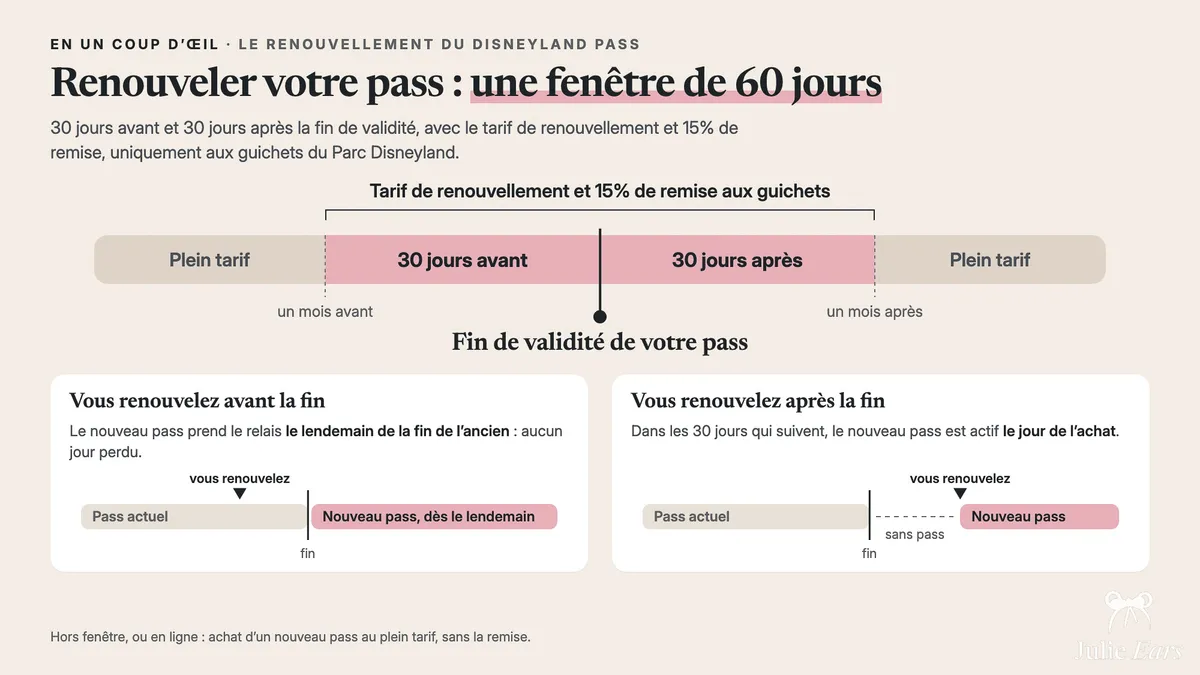
The renewal offer: 15% at the ticket windows
Where to renew: in person at the windows (plus your online options)
Strictly speaking, you can’t renew online. From your account or the Disneyland Paris app (in the section that lists your passes), the only thing you can do is buy a new Disneyland Pass at full price, without the 15% discount and without the renewal offer. That mostly helps if you’ve missed the renewal window. To renew with the discount and no gap in coverage, head to the ticket windows (see the other tab).
At the annual pass ticket windows, located underneath the Disneyland Hotel at the entrance to Disneyland Park, open daily from 8:30 to 17:00 (the wait depends on how busy it is). This is where you should go to get the 15% discount when you renew, and it’s the only place to switch to a higher tier: bring your current, valid pass and ask there.
Affiliate link · Disney’s official prices
Where are the ticket windows, and when are they open?

Digital pass or physical card
Unless you ask otherwise, your Disneyland Pass comes in digital form: a QR code stored in the Disneyland Paris app, in the section that lists your passes, which you scan at the gates. It’s the simplest option because your phone is always with you, and nothing is lost if a card goes missing.
The physical card is still available and it’s free, but only at the ticket windows. If you renew at the ticket windows, you’re handed the card automatically, no need to ask. If your pass is digital (say, a new pass bought online) and you’d like the physical card, just stop by the ticket windows and ask for it.
Digital works for most guests. The physical card still comes in handy in a few situations: for families with young kids who don’t have a phone, for lending a pass to someone close to you for a visit, or simply as a backup if your phone battery dies in the middle of the day.
Get the Disneyland Paris app on your phone before your trip. You’ll see live wait times along with show and parade schedules, and you can use it to book your restaurants, handle your ticket, and get around with the park map. It basically runs your day for you.
What to bring to the ticket windows
- A photo ID A national ID card or passport, so they can identify you when you renew.
- A way to pay Credit or debit card, or cash, whichever suits you.
- Your bank details (RIB) You’ll only need these if you go with monthly payments.
- Your current pass Digital, in the app (under "My Disneyland Pass"), or the plastic card.
- A CMI card (France’s official disability card) Only if you’re requesting the disability rate (the 25% discount for guests with reduced mobility).
Renewing with monthly payments: the down payment still applies
Just like a first purchase, you can pay for your renewal all at once or monthly (if you go monthly, remember your bank details). Monthly payment works under exactly the same terms as a purchase: you pay at least the minimum amount requested at the window (you can pay more if you want), and the balance is split into 11 monthly installments.
When does your renewed pass become active?
Moving to a higher tier (upgrade)
Renewing doesn’t have to mean getting the same pass again. You can upgrade, meaning switch to a more complete pass. Here’s the lineup, from the most basic to the most complete:
- Bronze One
- 170 days of access, 1 park per visit.
- Bronze Max
- 210 days of access, 2 parks per visit.
- Silver
- 300 days of access, 2 parks per visit.
- Gold
- 365 days of access, 2 parks per visit.
Upgrades are done at the ticket windows, with your current pass. Two situations, two prices:
- When you renew (within the 30-day window around your expiration date): you pick the higher tier right away and get the 15% discount on that new pass.
- Partway through the year (you want to move up a tier without waiting for your pass to run out): the switch is prorated, without the 15% discount. How that’s calculated is explained right below.
In both cases, your upgraded pass starts working on the day following your purchase, whereas a straightforward renewal kicks in that same day.
To figure out which tier is right for you (days of access, parks, discounts, and whether it pays for itself based on how often you visit), I won’t repeat the comparison here: it’s all in my Disneyland Pass guide.
How much does it cost to upgrade partway through the year?
Your current pass is refunded on a prorated basis
When you upgrade outside the renewal period, Disneyland Paris works out the unused portion of your current pass (prorated based on the validity time left). That amount isn’t lost: it’s credited toward your new pass.
The remaining amount goes toward the new pass
Whatever you’re refunded on that prorated basis comes off the price of the higher tier you’re switching to. In other words, you’re only charged the gap between the two passes, never the new pass’s full price.
Monthly payments are recalculated (if you pay monthly)
If your current pass is on a monthly plan, the old plan is stopped and new monthly installments are calculated for the higher-tier pass. Your monthly charge is adjusted to match the new pass.
You may be asked for a down payment
Depending on your situation, you may be asked for a partial or full down payment when you upgrade, on top of the recalculated monthly installments. The cast member at the window walks you through the details before you confirm.
For exact prices
The amounts depend on the tier you start from, the tier you move to, and how much time is left on your pass, so I don’t give fixed prices here. You’ll find the full price breakdown in my Disneyland Pass guide.
A bit of history: upgrading from the old passes in 2023
Dig deeper
This article walks you through renewing or upgrading. To compare the four passes, understand the prices, and find out which one suits you, the complete guide brings it all together in one place.
Read the Disneyland Pass guideFrequently asked questions
01 When can I renew my Disneyland Pass?
The renewal window opens one month before your pass’s expiration date and closes one month after it. That gives you two months in all to renew at the ticket windows and keep your membership unbroken. Once that window closes, you have to start over with a brand-new purchase. I always keep an eye on my expiration date so I stay on time and keep the renewal offer.
02 Is there a Disneyland Pass renewal discount, and how do I get it?
Yes. You get 15% off when you renew within the set window (1 month before to 1 month after your pass’s end date). Watch out: it’s only available at the Annual Passport ticket windows in Disneyland Park. You can’t renew online (online, you can only buy a new pass at full price). When you renew in person within that window, the discount is applied automatically, with no code or extra steps, and you get a free Disneyland Pass lanyard.
03 Is online renewal possible, or is it ticket windows only?
Renewals are only handled at the Annual Passport ticket windows in Disneyland Park: it’s the only way to renew and get the 15% discount. Online (in your Disneyland Paris account or the app), renewing isn’t an option. All you can do is buy a new pass at full price, without the renewal offer.
04 What should I bring to renew at the ticket windows?
Bring photo ID, a way to pay (card or cash), your current pass (digital or card), and, if you’re paying in installments, your French bank account details (RIB).
05 Can I upgrade to a higher tier when I renew?
Yes. The ladder runs from Bronze One up to Bronze Max, then Silver, then Gold. Renew at the ticket windows during the window and the 15% discount applies to whichever new tier you pick.
06 When does my renewed pass become active?
Renew ahead of the expiration date and your new pass starts the day after the old one runs out, so there’s never a gap. Renew once it has already expired and it starts on the purchase date. In other words, renewing early doesn’t cost you any days.
07 How do I stop or not renew my Disneyland Pass?
The Disneyland Pass doesn’t renew automatically. It simply expires on its end date. So to stop it, you just don’t renew, and there’s nothing to cancel. If you chose monthly payments, those continue until the end of your one-year commitment.

